How to sell an e-book on Instagram, from the post to delivering the file
The complete workflow for selling an e-book, spreadsheet or guide on Instagram: sales page, payment by Pix or card, file delivery and promotion that doesn't feel like spam.
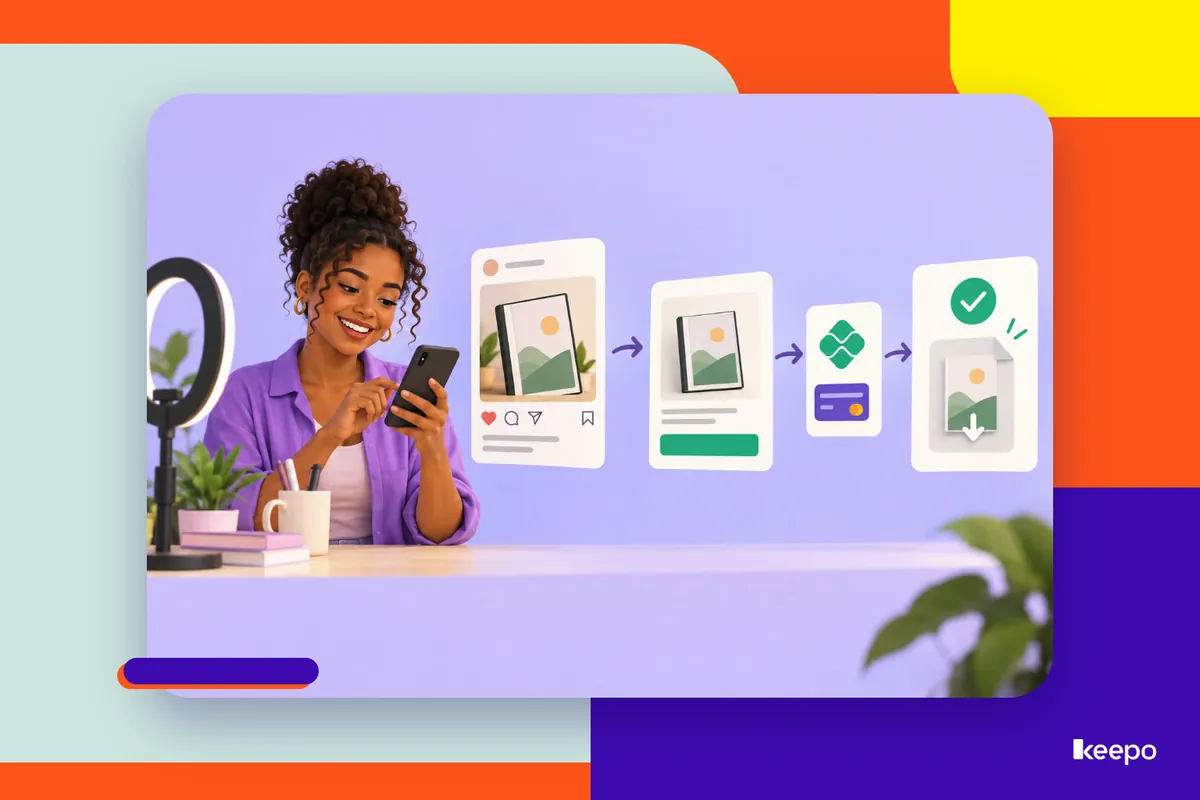
Creating the e-book is usually the easy part. The trouble starts afterward: where does the customer pay, how do they get the file, what do you write to convince someone who has never bought from you? This guide walks you through the whole process, from the Instagram post to the PDF landing in your customer's hands. It works for e-books, spreadsheets, checklists, guides or any other digital product.
Before you sell: make it clear what problem your product solves
Nobody buys "an e-book about personal finance." People buy "getting out of debt in 3 months by tracking expenses in a spreadsheet." Before you build any page, answer this in one sentence:
- Who it's for: beginners, people who tried and gave up, people who work in a specific field.
- What the reader can do after reading it: plan a weekly menu, price a service, organize their inventory.
- Why buy from you: your experience with the topic, what you already do day to day.
That sentence will become your page headline, your post captions and your story hooks. If it's still fuzzy, your sales will be too.
Build a sales page that's simple but complete
Your sales page doesn't need to be long. It needs to answer the questions that would make someone give up. People coming from Instagram are on their phones and short on time, so get straight to the point.
What to include on the page
- A headline that states the result: "Spreadsheet to organize your bakery's finances" beats "Pro Finance Spreadsheet."
- Who it's for and who it isn't for: saying the product is for beginners prevents wrong purchases and complaints later.
- What's inside: a table of contents or list of topics, page count, format (PDF, Google Sheets, Excel).
- A sample: an example page, a screenshot of the filled-in spreadsheet. Showing reduces skepticism.
- Who you are: two or three lines about your experience, without exaggerating.
- Price and payment methods: visible, not hidden.
- How the product is delivered: by email, WhatsApp or download link, and how quickly.
- How to ask questions: a WhatsApp or contact button.
With Keepo, you can put all of this on your own minisite, alongside your other bio links: the product with a description, image and price, plus a buy button. That way customers don't have to jump from site to site to understand what they're getting.
Pix and card payments: remove the friction
Lots of sales are lost at checkout. The classic "DM me and I'll send you my Pix key" works at first, but it adds steps: the person has to send a message, wait for your reply, copy the key, pay and send the receipt. Somewhere along the way, they give up or forget.
Ideally, customers should be able to pay on their own, the moment they decide to buy, preferably at any time of day. A few recommendations:
- Offer Pix and card: some people prefer paying upfront with Pix, and some only buy by card.
- Ask for the details you need for delivery: name and email or WhatsApp, so you know where to send the file.
- Make the final price clear: no surprises at checkout.
With Keepo, Pix and card payments live on your own page, so people see the product and pay in the same place.
File delivery: decide before your first sale
Don't wait until you've made a sale to figure out delivery. Set up your process and test it on yourself or a friend.
Common ways to deliver
- Download link sent by email or WhatsApp: you host the file (on Google Drive, for example) and send the link as soon as the payment is confirmed.
- Spreadsheet copy: for Google Sheets, a link that creates a copy for the customer keeps them from editing your original.
- Attached file: works for small PDFs, but watch out for large files that hit email size limits.
What to send along with the file
A short welcome message makes a difference in the experience. For example:
Hi Ana! Thanks for your purchase. Here's the link to your guide: [link]. If you have any trouble opening it, just reply to this message and I'll help you out.
Before you promote it, check: does the link open on a phone? Is it set so anyone with the link can view it? Does the file have the right name? Permission errors are the most common complaint for people selling digital products.
How to promote on Instagram without feeling like spam
Selling on Instagram isn't posting "buy my e-book" every day. It's regularly showing the topic your product covers and reminding people it exists.
In your bio
Say what you do in one line and add the link to your page. Something like "I help bakers price without losing money. Spreadsheet at the link 👇". On your minisite, feature the product at the top, not buried among ten links.
In your feed
- Post useful content related to your product: a tip from the e-book, a common mistake, a before-and-after.
- At the end of some posts, make the connection: "This is chapter 2 of my guide. The full version is at the link in my bio."
- Create a pinned post explaining the product: what it is, who it's for, what's inside.
In your stories
- Show what goes on behind the scenes: you using the spreadsheet, flipping through the PDF, answering a question.
- Use the question sticker about your topic and answer thoughtfully. The questions become content and selling points for your sales page.
- When someone gives feedback on the product, ask permission before sharing the screenshot.
- Add the link to your stories when you talk about the product, so people don't have to go looking for it.
The balance that keeps you from looking spammy
A simple rule of thumb: most of what you post should help even people who will never buy. The sale should come as a natural result of your content, not as an interruption. When people learn something from you for free, they tend to trust what you charge for.
Mistakes that kill trust with people who've never bought from you
- Hiding the price: "DM me for the price" drives a lot of people away. People who don't know how much it costs often don't even ask.
- Not showing any of the content: without a sample, table of contents or screenshot, people are buying blind and they hesitate.
- Overpromising: "get rich with this e-book" sounds like a scam. Promise what the product actually delivers.
- Not explaining delivery: if customers pay and don't know when they'll receive it, they get anxious and start sending worried messages.
- Taking too long to respond after the purchase: the first experience decides whether someone comes back and recommends you.
- A cluttered page full of links: when everything has the same emphasis, nothing stands out. Make the product easy to find.
- Being hard to reach: having a visible channel for questions shows there's a real person behind the sale.
Checklist before you publish
- A clear sentence about what the product solves and who it's for.
- A page with headline, contents, sample, price, delivery method and contact.
- Pix and card payments working.
- Delivery process defined and tested on a phone.
- Welcome message ready.
- Link in bio and a pinned post explaining the product.
If your product is ready, the next step is giving it an organized storefront. Create your Keepo, add your e-book to your page with a description and price, get paid by Pix and card, and have your bio link ready for when your content makes someone want to buy.